DevOps
Centralized Logging for a simple Web App (2026): VictoriaLogs + VMUI + Basic Auth, in One Docker Compose
Logs are the “dark matter” of software: invisible when everything works, crucial when it doesn’t. Here’s a clean, low-friction way to collect logs from a PHP container, store them in VictoriaLogs, explore them in VMUI, and protect access with a simple login/password gate.

The goal: a “good enough” log system you’ll actually use
If you’ve ever SSH’d into a server and grepped a log file at 3am… you already know the problem: logs are everywhere, formats are inconsistent, and the one thing you need is always on the wrong machine.
Centralized logging fixes that. You collect logs from apps and infrastructure into one place, and you get fast search, filters, and a UI for exploring patterns.
- PHP app writes structured logs to stdout (JSON Lines).
- Vector reads container logs from Docker and forwards them.
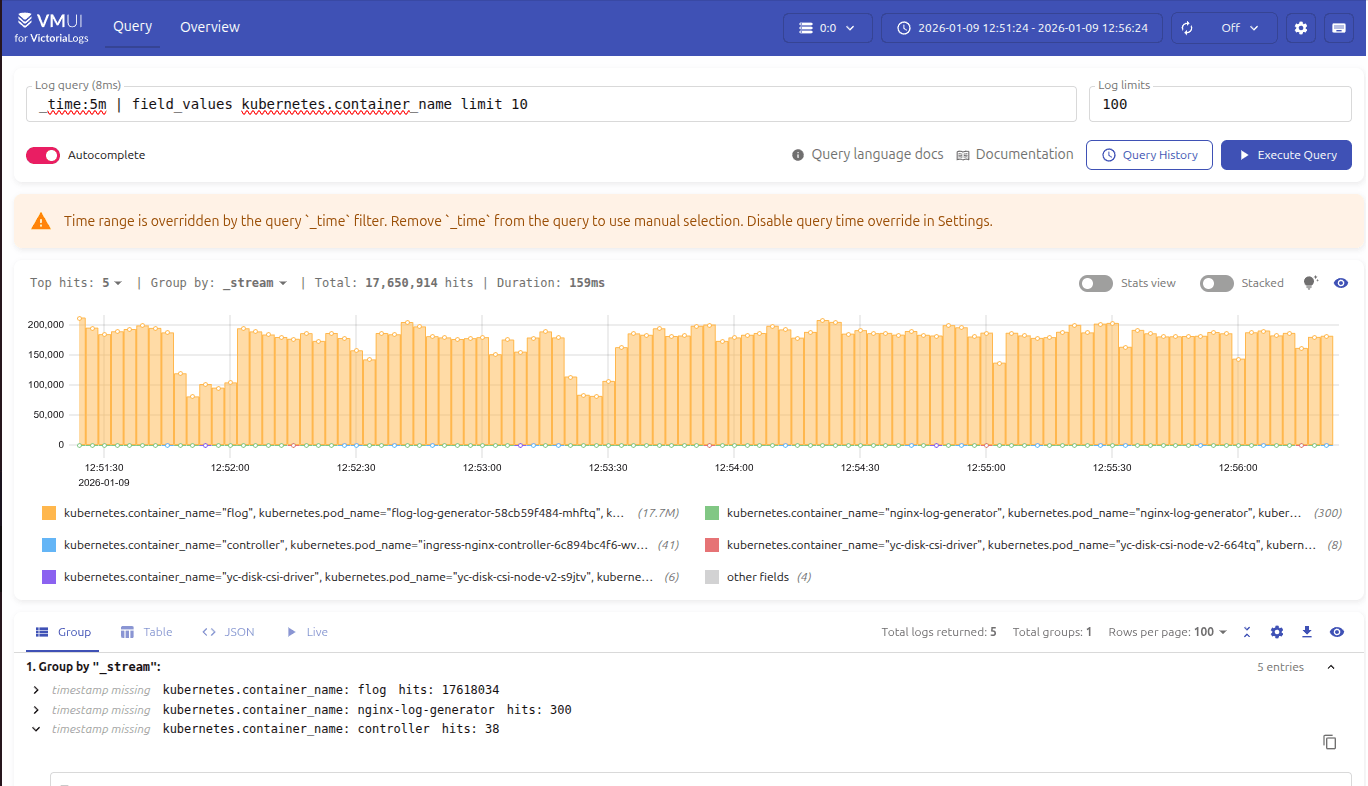
- VictoriaLogs stores logs and exposes VMUI at
/select/vmui/. - vmauth adds Basic Auth and path-based access control in front of VictoriaLogs.
Why structured logs (JSON Lines) beat “pretty text”
Humans like pretty logs. Machines prefer predictable logs. With JSON Lines (one JSON object per line), you can filter by any field later: level=ERROR, service=api, status=500, user_id=123, and so on.
VictoriaLogs is designed for this kind of log stream: it can index arbitrary fields and query them with LogsQL. That means you don’t need to pre-design a rigid schema the day you start.

Streams: the performance trick most people miss
VictoriaLogs has a concept of streams. During ingestion you can choose a few fields that define a stream (e.g., container name, host, environment). Queries that filter by stream fields get much faster.
The key rule: do not put high-cardinality fields (like request_id) into stream fields. Use stable identifiers such as service, env, host, container_name.
Security: Basic Auth without touching your app code
This is the nice part: you don’t need to implement auth inside VictoriaLogs or your PHP app. Put vmauth in front of VictoriaLogs and publish only vmauth to the outside. VictoriaLogs stays internal to the Docker network.

Copy‑paste stack: Docker Compose + configs
The compose below includes four services: victoria-logs, vmauth, vector, and php-app.
docker-compose.yml
services:
  victoria-logs:
    image: victoriametrics/victoria-logs:latest
    command:
      - -storageDataPath=/vlogs
      - -retentionPeriod=14d
    volumes:
      - vlogs-data:/vlogs
    expose:
      - "9428"

  vmauth:
    image: victoriametrics/vmauth:latest
    command:
      - -auth.config=/etc/vmauth.yml
      - -httpListenAddr=:8427
    volumes:
      - ./vmauth.yml:/etc/vmauth.yml:ro
    ports:
      - "8427:8427"
    depends_on:
      - victoria-logs

  vector:
    image: timberio/vector:latest-alpine
    volumes:
      - /var/run/docker.sock:/var/run/docker.sock
      - ./vector.yaml:/etc/vector/vector.yaml:ro
    depends_on:
      - victoria-logs

  php-app:
    image: php:8.3-cli-alpine
    working_dir: /app
    volumes:
      - ./php-app:/app:ro
    command: ["php", "/app/loggen.php"]

volumes:
  vlogs-data:
vmauth.yml (Basic Auth + allow only /select/*)
users:
  - username: admin
    password: admin123
    url_map:
      - src_paths: ["/select/.*"]
        url_prefix: ["http://victoria-logs:9428"]
vector.yaml (read Docker logs → send JSON Lines to VictoriaLogs)
sources:
  docker_logs:
    type: docker_logs
    exclude_containers: ["victoria-logs", "vmauth", "vector"]

sinks:
  vlogs:
    type: http
    inputs: ["docker_logs"]
    uri: http://victoria-logs:9428/insert/jsonline?_stream_fields=host,container_name&_msg_field=message&_time_field=timestamp
    compression: gzip
    encoding:
      codec: json
    framing:
      method: newline_delimited
php-app/loggen.php (a tiny JSON logger)
<?php

declare(strict_types=1);

function logLine(string $level, string $message, array $context = []): void
{
    $payload = [
        'time' => (new DateTimeImmutable('now', new DateTimeZone('UTC')))->format(DATE_ATOM),
        'level' => $level,
        'message' => $message,
        'service' => 'php-app',
        'env' => 'local',
        'request_id' => bin2hex(random_bytes(8)),
    ] + $context;

    // One JSON object per line (stdout)
    fwrite(STDOUT, json_encode($payload, JSON_UNESCAPED_SLASHES | JSON_UNESCAPED_UNICODE) . PHP_EOL);
}

$levels = ['DEBUG', 'INFO', 'WARN', 'ERROR'];

while (true) {
    $level = $levels[random_int(0, count($levels) - 1)];
    logLine($level, 'demo log line', [
        'path' => '/demo',
        'status' => (string)random_int(200, 599),
    ]);

    usleep(300_000);
}
Run it, then “touch the UI”
From the project folder:
docker compose up -dOpen VMUI (you’ll be prompted for Basic Auth):
http://localhost:8427/select/vmui/Credentials (from vmauth.yml):
admin / admin123Starter searches you can paste into VMUI:
_time:5m
error _time:1h
{container_name="php-app"} _time:5m | sort by (_time)
What to improve when you move beyond “demo mode”
- Real PHP logs: use Monolog / PSR-3 style structured output to stdout (still JSON Lines).
- Better stream fields:
service,env,host,k8s_namespace,container— keep them stable. - Separate write/read access: let only collectors hit
/insert/*; let humans hit only/select/*. - TLS at the edge: put caddy/traefik/nginx in front of vmauth if you need HTTPS.
Further reading (official docs + practical examples)
- VictoriaLogs main docs: https://docs.victoriametrics.com/victorialogs/
- VMUI location (example): https://docs.digitalocean.com/products/marketplace/catalog/victorialogs-single/
- Ingestion (incl. /insert/jsonline): https://docs.victoriametrics.com/victorialogs/data-ingestion/
- Querying (LogsQL API): https://docs.victoriametrics.com/victorialogs/querying/
- LogsQL examples: https://docs.victoriametrics.com/victorialogs/logsql-examples/
- Security + vmauth in front of VictoriaLogs: https://docs.victoriametrics.com/victorialogs/security-and-lb/
- vmauth reference docs: https://docs.victoriametrics.com/victoriametrics/vmauth/
- Hands-on Vector + VictoriaLogs (example): https://datmt.com/devops/quick-setup-for-monitoring-stack-with-victorialogs-and-vector/